Story Splitting Is a Competitive Advantage
The single biggest predictor of whether a team ships predictably is how small their stories are. Not velocity. Not standups. Not the tool they use to track work.
I've watched teams go from two-week slogs ending in "we're almost done" to shipping value every day, and the change was never a new framework. It was learning to cut a feature into pieces that each deliver something real.
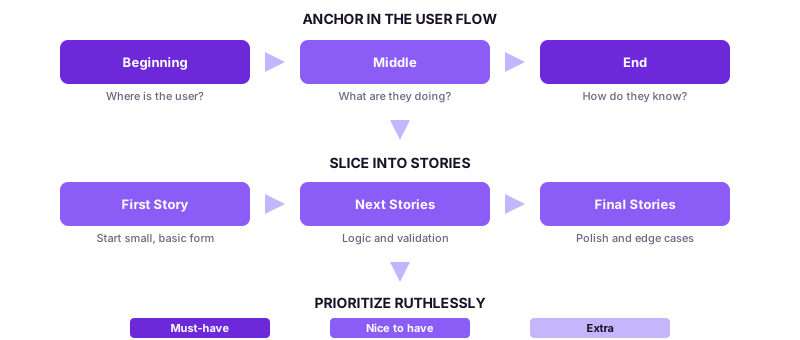
Anchor in the User Flow
Start with the experience, not the features. You've got a user flow, defined outcomes, maybe mockups. Map that flow across three stages:
Beginning
Where is the user? What just happened? What's their mindset?
Examples:
- They clicked an email
- Just logged in
- Landed on a dashboard
Middle
- What are they trying to do?
- What actions do they take?
- What happens after that - are there multiple paths?
End
How do they know they're done?
- Confirmation message
- Email sent
- Updated status
Each slice should deliver a piece of value on its own.
Slice Stories Like a Pro
Once the flow is clear, break it into logical, buildable pieces. Not one massive ticket. Not a Jira novel. Discrete chunks that each do something a user would notice.
First Story
Start small.
Example: A basic form loads with three pre-filled fields with a disabled button.
Next Stories
Add logic, validation, and conditional behaviors.
Example: Wire up the Submission button once all required fields are filled.
Side note: do better than "Submit." "Send Message" and "Share Feedback" tell users what's actually happening.
Final Stories
Polish. Visual tweaks, updated copy, tooltips, placeholder text, edge case handling. Each story builds cleanly on the last.
Call Out What's New vs. Reused
This prevents half the scope creep I see on teams. Label everything:
- New UI: Screens, buttons, inputs, links that don't yet exist.
- Pre-existing UI: Components you can reuse or duplicate.
- Shortcuts: Items that can be hardcoded for now or logic that can be simplified.
Duplication kills velocity. Ambiguity kills confidence. Label it and move on.
Cover the Details to Unblock Engineering
Capture Inputs and Logic
- What values do users enter?
- Where is the data stored?
- Do we need analytics or event tracking?
List Dependencies
- Backend or API needs
- Copy or images from content teams
- Feature flags or environment setup
Prioritize Ruthlessly
Label every element as:
- Must-have
- Nice to have
- Extra or delightful
Final Checklist
- User flow covers beginning, middle, and end
- Stories are sliced into shippable chunks
- UI is labeled new vs. reused
- Priorities are clear
- Inputs, copy, and logic are covered
- Dependencies are listed and sequenced
Breaking down work this way isn't extra process. It's the thing that makes everything else faster.
If your team's stories keep ballooning into multi-sprint epics, let's talk.
Related services
Frameworks for this topic
Read next
Most teams argue about research as a binary: do it or skip it. Both extremes lose. Months of upfront research goes stale before build starts, and no research turns designers into pixel machines. I spent four years at Pivotal coaching the narrow middle: just enough research, at the right moments, to go fast forever.
We know consent has to be freely given, reversible, informed, enthusiastic, and specific when it's about our bodies. Our data is a body too. Here's what happens when you run your product's data handling through the same five tests, and why a cross-tenant leak is a consent failure, not just a security bug.
Most teams aren't balanced. One discipline decides and the others execute. I spent four years at Pivotal coaching the alternative, and the difference between the two isn't org charts. It's who has voice, who has a vote, and whether the team can celebrate a failed experiment without flinching.
Want to work together?
I help teams ship better products. Let's talk about your situation.
Get in touch